New Feature: Inline Checklists
2 de marzo de 2010
Got knocked off the air yesterday (internet can still be a bit flakey in Buenos Aires) so I decided to polish off an old idea that had been hanging on a branch on my local machine for awhile… inline checklists!
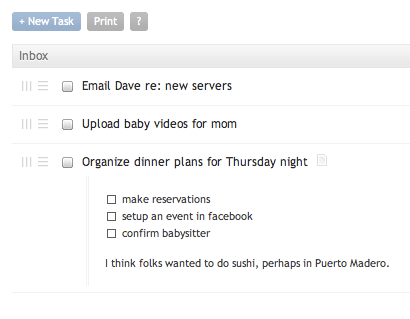
Notice that the notes area under the third task has a checklist. We’re calling them checklists instead of subtasks, as it really is just a checklist of things that I might want to tick off as part of completing a task. If I required the granularity of context filtering and due dates I might have creating a project with tasks under it, but in this case I just wanted a list of things I needed to consider… and there is something satisfying about checking things off as they are addressed.
Here’s how it works: Nirvana will convert any line in a task note that begins with a “- “ (hyphen space) and will replace it with a checkbox. Checked items will replace the “-” with an “x” in the notes, and that’s it.
- item one
- item two
- item three
If I were to check items 1 and 2, the task note will be updated as:
x item one
x item two
- item three
If you want to update the list, edit or move things around, click on the task name to bring up the edit dialog and make changes to the notes area.
And that’s all there is to it. Super simple.