Changes: Left Navi
October 7, 2011
Heads up for the next release: we’ve moved things around in the left navi a bit. It’s nothing radical, but might take a bit of getting used to for the old guard.
- The filter-by-area menu has been pushed up to the global navi
- Focus has been placed below the standard GTD lists
- Projects has been renamed My Projects
- We’ve visually delineated and grouped items more clearlyCollect / Actions / Projects / Cleanup
[caption id=”attachment_1108" align=”aligncenter” width=”191" caption=”revised left navi”]
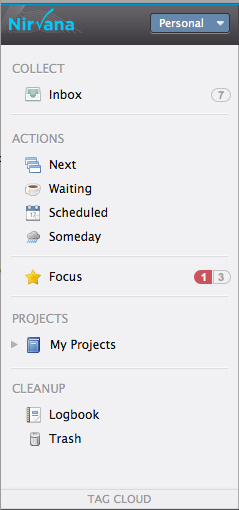
[/caption]
Impact to keyboard shortcuts: numbers 1 through 9 have been remapped.
Impact to area filtering: search results are now filtered to match only items within the selected area. Logbook too. Inbox and Trash are the only exceptions to the (filtering) rule. We think this makes sense. By definition, inbox = unprocessed items, so applying a filter to these items is presumptuous. And really, who needs multiple trash cans.